
Why Deleted Files from Network Shares Don’t Go to the Recycle Bin
Deleted files from network shares don’t go to the Recycle Bin, and this surprises many Windows administrators the first time it happens. If you’ve ever deleted a file from a shared folder or network drive and then looked for it in the Recycle Bin—only to find nothing—you’ve encountered one of the most misunderstood behaviors in Windows file server environments.
This page explains why that happens, where those files actually go, and how organizations protect themselves from accidental file deletion on Windows file servers.
Why This Confuses So Many IT Teams
This issue catches many IT teams off guard because it breaks an expectation formed by years of working with local files. On Windows desktops, deleted files usually go to the Recycle Bin, making recovery straightforward. When the same behavior doesn’t occur on network shares, users assume something is broken, permissions are misconfigured, or data is permanently lost.
In reality, Windows handles deletions from network shares differently by design. Files removed from shared folders often bypass the local Recycle Bin entirely, which forces administrators into slow backup restores, forensic investigations to determine who deleted what, or uncomfortable conversations with users who need files back immediately. This gap between expectation and reality is what makes network share deletions such a persistent and costly problem.
How Windows Handles File Deletions from Network Shares
When a file is deleted from a network share or shared folder, Windows processes the deletion on the file server itself rather than on the user’s local machine. This architectural difference is why deleted files from network shares do not interact with the Recycle Bin.
It’s also important to understand that the Windows Recycle Bin itself is more limited than many users realize. Even on a local machine, the Recycle Bin only captures files that are deleted through File Explorer.
Files deleted by applications, scripts, or command-line tools – such as PowerShell or Command Prompt – typically bypass the Recycle Bin entirely and are removed immediately. In those cases, the Recycle Bin provides no protection, even though the files were deleted locally.
Network share deletions take this one step further. Because the deletion is processed directly on the file server, there is no opportunity for the user’s local Recycle Bin to capture the file at all.
When a file is deleted from:
-
A mapped network drive
-
A shared folder hosted on a Windows file server
…the deletion request is processed on the server, not on the user’s workstation.
Because of this:
-
The user’s local Recycle Bin is never involved
-
The server does not maintain a Recycle Bin for network shares by default
-
The file is immediately removed from the file system
From Windows’ perspective, this behavior is expected — but for users and IT teams, it often feels like data disappeared without warning.

Before File Deleted From Network Share – Warning
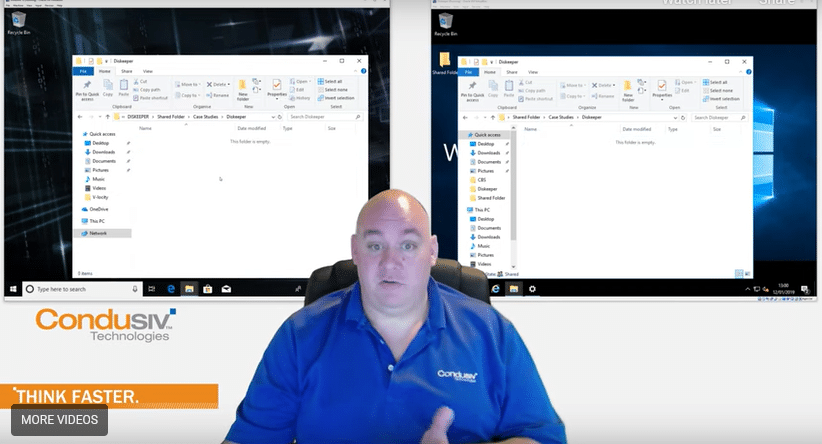
After File Deleted From Network Share – File Gone From Server
Why There Is No Recycle Bin for Network Shares in Windows Server
Windows Server does not include a native Recycle Bin for network shares because file deletions from shared folders are handled differently than local file deletions.
When a user deletes a file from a network share, the action is processed directly by the file server using standard file system operations. Unlike local deletions, there is no per-user Recycle Bin context available on the server to temporarily store those files.
In shared environments, multiple users may access the same folders simultaneously, often from different machines. Because of this, Windows does not maintain a centralized “network recycle bin” that can safely track ownership, permissions, and restore actions for deleted files.
As a result, files deleted from network shares and shared folders are typically removed immediately, without any built-in safety net — even when the deletion was accidental.
Where Do Files Go When Deleted from a Network Shared Folder?
In most Windows Server environments, files deleted from network shares:
-
Do not go to any Recycle Bin
-
Are not recoverable through standard Windows tools
-
Are immediately removed unless another protection mechanism exists
At that point, recovery options are limited to:
-
Restoring from backup (if available)
-
Third-party recovery tools
-
Accepting permanent data loss
This is why accidental deletions from shared drives are one of the leading causes of avoidable data loss in business environments.
👉 Learn more here:
Where Do Files Go When Deleted from a Network Shared Folder?
Why Backups Alone Don’t Solve This Problem
Backups are essential — but they aren’t designed to handle everyday file deletion events.
Common challenges include:
-
Backups run on schedules, not in real time
-
Restoring individual files can take time
-
Users often need files recovered immediately
-
Backup restores may overwrite newer data
This gap between deletion and recovery is exactly where most organizations experience disruption.
The work performed between the time of the last backup and the time of data loss is not protected by backups.
What People Mean When They Ask for a “Network Recycle Bin”
When administrators search for:
-
“network recycle bin”
-
“recycle bin for shared folders”
-
“recover deleted files from network drive”
They’re usually not looking for a Windows setting.
They’re looking for a way to:
-
Capture deletions from shared folders
-
Recover files quickly
-
Prevent permanent loss caused by simple mistakes
Windows does not include a native network recycle bin — but there are solutions designed to fill this gap.
How Organizations Prevent Permanent Deletion from Network Shares
To protect shared folders and file servers, organizations use tools that:
-
Capture file deletions in real time
-
Preserve deleted files for quick recovery
-
Work alongside existing backup systems
-
Require no changes to user workflows
One such solution is Undelete Server from Condusiv Technologies, which acts as a safety net for Windows file servers by capturing deletions — including files deleted over the network.
👉 Learn more here:
Preventing the Next Accidental Deletion
Accidental deletion from a network share is rarely a one-time event.
As teams grow and file servers remain in use:
-
More users access shared data
-
Permissions change
-
Mistakes become inevitable
Understanding why deleted files from network shares don’t go to the Recycle Bin helps organizations avoid permanent data loss and put the right safeguards in place.