
How DymaxIO Works: Reducing Windows I/O Inefficiency Before It Reaches Storage
Most Windows performance conversations start with hardware.
When applications slow down, databases take longer to respond, virtual desktops become less responsive, or servers begin struggling under load, the first assumption is often that the infrastructure needs more capacity.
More storage.
More memory.
More CPU.
More cloud resources.
A larger hardware refresh.
But in many Windows environments, a significant amount of performance is lost before the workload ever reaches the underlying infrastructure.
DymaxIO® is designed to address that problem.
It improves performance by reducing the inefficiencies generated inside Windows, helping systems operate more efficiently before unnecessary I/O reaches storage, virtualization, or cloud infrastructure.
The Hidden Problem: Windows I/O Inefficiency
Windows systems constantly read, write, move, and retrieve data.
Over time, that activity can become inefficient. Files and free space become fragmented. I/O operations become smaller and less sequential. Applications and services create unnecessary background activity. Memory that could be used more effectively is underutilized.
Individually, these inefficiencies may seem small.
Together, they create a “death by a thousand cuts” effect across the environment.
Instead of clean, efficient data movement, systems generate excess I/O activity that consumes resources at multiple layers of the stack, including:
- Server CPU and memory
- Storage throughput and IOPS
- Networked storage paths
- Virtual infrastructure
- Cloud compute and storage resources
- User and application responsiveness
This is why adding more hardware does not always solve the real problem. If Windows continues generating inefficient I/O, the same inefficiency simply continues on newer, faster, or more expensive infrastructure.
DymaxIO helps by reducing that waste at the source.
DymaxIO Works Before the I/O Reaches Storage
Many performance tools focus on monitoring, reporting, or reacting after a problem appears.
DymaxIO takes a different approach.
It works inside the Windows environment to help optimize how data is written, read, cached, and accessed before inefficient I/O reaches the underlying storage layer.
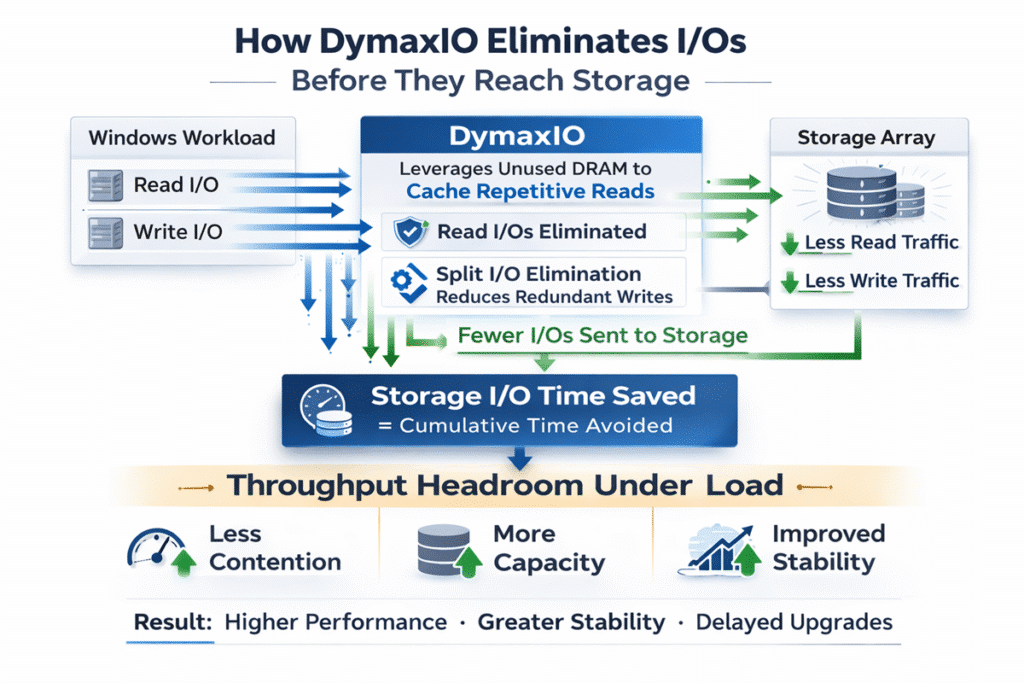
That matters because every unnecessary or inefficient operation that can be reduced before it reaches storage helps lower the strain on the rest of the infrastructure.
The result is a more efficient Windows system, with less wasted I/O activity flowing downstream.
This can help improve performance across physical servers, virtual machines, cloud environments, and endpoint systems without requiring application changes or hardware replacement.
IntelliWrite: Real-Time Write Optimization for Efficient I/O
One of DymaxIO’s core technologies is IntelliWrite®.
IntelliWrite is a patented write optimization technology that improves how Windows handles data before it is written to storage. Instead of allowing inefficient, excessively small, fractured, and random I/O patterns to occur, IntelliWrite provides file size intelligence to the Windows operating system so it can make better allocation decisions at the logical disk layer.
Without this intelligence, Windows typically writes data to the next available address, regardless of whether that location is appropriate for the size and structure of the file. This often results in inefficient I/O patterns that require multiple operations to write and later retrieve data that could have been handled more efficiently.
IntelliWrite works in real time to guide Windows toward creating larger, cleaner, more contiguous write operations. This ensures that each I/O carries a greater payload, reducing the total number of I/O operations required for a given workload.
This matters because inefficient I/O patterns create unnecessary work across the entire infrastructure stack.
When data is written and read in smaller, disjointed operations, the system must perform more I/O requests to accomplish the same task. In busy environments, this contributes to increased latency, reduced application responsiveness, and higher demand on storage systems.
By reducing the number of I/O operations required, IntelliWrite not only improves efficiency at the Windows level, but also helps reduce the amount of I/O being mixed and randomized at the hypervisor or storage layer. This helps mitigate the “I/O blender” effect commonly seen in virtualized and shared storage environments.
The result is more efficient data movement, fewer unnecessary I/O operations, and improved performance across the entire environment.
IntelliMemory: Intelligent Read Caching That Reduces Trips to Storage
IntelliMemory® is DymaxIO’s patented read I/O optimization and caching engine.
It intelligently uses available system memory to cache frequently accessed data, allowing more read requests to be served from memory instead of repeatedly traveling to storage.
This matters because Windows systems often have idle or underutilized memory while applications continue generating repeated read requests. Each unnecessary trip to storage adds work to the infrastructure and can contribute to latency, slower response times, and higher I/O demand.
IntelliMemory addresses this by dynamically leveraging available DRAM to keep frequently accessed data closer to the workload.
By satisfying more read operations directly from memory, DymaxIO reduces the number of requests that need to reach storage. This helps lower I/O traffic, reduce latency, and improve responsiveness for active workloads.
This is especially important in environments where many users, applications, or virtual machines are competing for shared infrastructure resources.
The goal is not to replace storage.
The goal is to reduce unnecessary trips to storage when data can be accessed more efficiently from memory.
Measure the Impact: DymaxIO Performance Dashboard and Analytics
DymaxIO does not simply run in the background and leave IT teams guessing.
It includes performance dashboard and analytics views that help show what DymaxIO is doing across the systems where it is deployed.
These views help organizations measure the impact of I/O optimization over time, including areas such as:
- Total I/Os eliminated
- Read and write I/Os eliminated
- Storage I/O time saved
- I/O response time
- Throughput
- IOPS
- Fragmentation prevented and eliminated
- Free space consolidated
- Data served from cache
- Memory usage and cache utilization
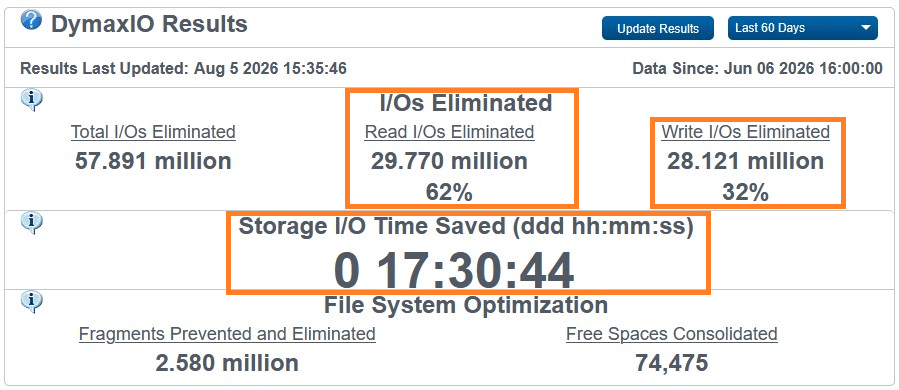
Example DymaxIO dashboard showing I/Os eliminated, storage I/O time saved, and related performance metrics.
This gives IT teams a clearer view into how much unnecessary I/O activity is being reduced before it reaches storage.
Instead of relying only on user complaints, subjective performance impressions, or infrastructure monitoring after problems occur, DymaxIO helps show measurable results from inside the Windows systems being optimized.
The dashboard can also help teams evaluate DymaxIO during a trial. By reviewing results over time, IT can see whether the software is reducing I/O activity, saving storage I/O time, improving cache efficiency, and helping systems operate more efficiently under normal workloads.
For organizations considering another hardware upgrade, this visibility is especially valuable.
It helps answer a practical question before more infrastructure is added:
Is the current environment truly out of capacity or is performance being wasted inside Windows?
Additional Specialized Engines and Technologies
Beyond IntelliWrite and IntelliMemory, DymaxIO includes additional specialized engines designed to address specific Windows performance and file system challenges.
These technologies work together to help reduce unnecessary I/O, prevent performance degradation, and keep systems operating efficiently across a wide range of Windows environments.
Why This Still Matters on SSD, SAN, NAS, Cloud, and Virtual Infrastructure
A common assumption is that modern infrastructure eliminates the need for Windows performance optimization.
After all, SSDs are faster than spinning disks. SAN and NAS platforms are more advanced. Cloud infrastructure can be expanded. Virtualization platforms are more flexible. Hyperconverged systems are designed for scale.
But Windows still behaves like Windows.
If the operating system is generating inefficient I/O, that inefficiency still has to move through the infrastructure.
Faster storage may mask the problem temporarily, but it does not eliminate the waste. In many environments, inefficient I/O can still contribute to:
- Higher latency under load
- More storage activity than necessary
- Greater infrastructure strain
- Reduced VM density
- Higher cloud resource consumption
- Shorter hardware lifecycle
- More frequent performance troubleshooting
This is why DymaxIO remains relevant in modern environments.
It does not matter whether the workload is running on physical servers, virtual machines, SSD, SAN, NAS, cloud, or hyperconverged infrastructure. Reducing wasted I/O before it reaches the infrastructure can still improve performance and efficiency.
How DymaxIO Helps Existing Infrastructure Perform Better
DymaxIO is designed to help organizations get more performance from the infrastructure they already own.
By reducing unnecessary I/O and improving how Windows handles data movement, DymaxIO can help:
- Improve application and database responsiveness
- Reduce latency under load
- Improve system stability and user experience
- Reduce strain on storage infrastructure
- Extend the useful life of existing hardware
- Delay or avoid unnecessary infrastructure expansion
- Improve performance without application changes
For IT teams, the value is not only faster systems.
It is also fewer performance emergencies, fewer unnecessary upgrades, and more confidence that current infrastructure is operating efficiently.
Where DymaxIO Has the Biggest Impact
DymaxIO is especially useful in Windows environments where performance issues are often blamed on hardware limitations.
Common use cases include:
SQL Server and Database Workloads
Database systems are highly sensitive to latency and I/O inefficiency. DymaxIO can help reduce unnecessary I/O activity and improve responsiveness for SQL Server and other database workloads.
VDI and Virtual Environments
Virtual environments multiply I/O demand across many systems. By improving Windows efficiency inside those systems, DymaxIO can help reduce strain on shared infrastructure and support better responsiveness across users and VMs.
Windows Servers
General-purpose Windows servers can degrade over time as workloads, files, and background activity accumulate. DymaxIO helps keep systems operating more efficiently without requiring a rebuild or hardware replacement.
Cloud and Hybrid Environments
In cloud environments, inefficiency can become a recurring cost. More I/O, more storage activity, and more compute demand can increase spend. DymaxIO helps reduce waste before it drives additional resource consumption.
PCs, Laptops, and Workstations
DymaxIO Client helps improve performance and responsiveness on Windows desktops, laptops, and workstations by reducing common sources of Windows performance degradation.
DymaxIO Does Not Require a Hardware Replacement Project
DymaxIO is designed to work with existing infrastructure.
It does not require:
- New servers
- New storage
- Application changes
- Major architecture changes
- A disruptive migration project
DymaxIO installs quickly, runs automatically in the background, and is designed to require minimal ongoing management.
For many organizations, that is the point.
Instead of treating every performance problem as a hardware problem, DymaxIO gives IT teams a way to reduce waste and improve performance inside the systems they already operate.
A Better First Step Before Buying More Hardware
There are times when new hardware is necessary.
But before expanding infrastructure, it is worth asking whether the existing environment is operating efficiently.
If Windows is generating excessive or inefficient I/O, then adding more hardware may only create temporary relief. The underlying inefficiency remains.
DymaxIO helps IT teams take a smarter first step:
Reduce the waste.
Improve the efficiency.
Measure the impact.
Then decide whether more hardware is truly needed.
See What DymaxIO Can Do in Your Environment
The best way to understand DymaxIO is to test it on your own systems under real workloads.
Start with a full-featured 30-day evaluation and see how much performance is already hidden inside the infrastructure you own.